2011
In December 2011, YouTube added a "Protecting Your Privacy" help page on their website.
The following is a 1:1 transcript of some of their points within that page.
Quick Tips:
Never post things like your name, phone number or where you live.
Prevent privacy trouble before it starts. Once your privacy has been compromised, you might not be able to undo the damage.
What is Protecting your Privacy?
Protecting your privacy means that you are taking care not to post personal information that could result in you being harmed over the Internet or in person.
YouTube takes our users' privacy seriously. Our Privacy Removals Process is a place that we've created for our users to report privacy violations. With this form, you can report privacy violations relating to your image, voice, full name, financial and other personally identifying information, such as your home address or phone number.
In other cases, where the user is revealing personal data, such as your home address, telephone number or other financial data, such as credit card numbers or bank account information, we allow direct reporting so that these cases can be reviewed as soon as possible.
How can I protect my privacy?
NEVER post personal information on your profile, such as the town you live in, where you go to school, your full name or your home address.
If a video contains personal information without your consent, such as your image, name, voice, home address, telephone number, national insurance/identification number or financial records, please contact us through our Privacy Removal Process.
Why should I protect my privacy?
Protecting your personal information can help prevent unwanted strangers from tracking you down physically or Internet strangers from stealing your identity or financial information. If your video is personal, consider marking it private, so that only your friends and those you share it with can view it. If you do post public videos, make sure that there isn't anything in them that could help a stranger figure out who you are or where you live.
2012
Around August 2012, Google+ integration to YouTube began.
Google+ was Google's attempt at social media. It launched in June 2011.
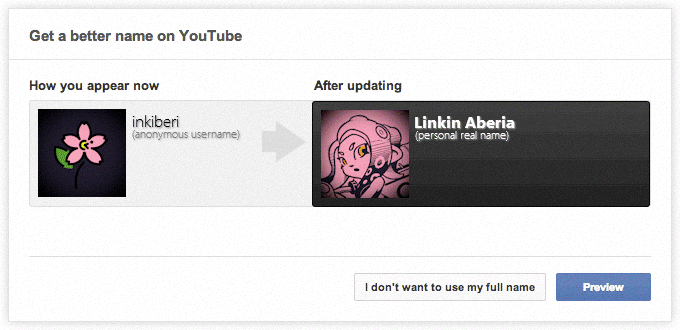
Users were prompted to have their anonymous YouTube channel's username display their personal real life name (taken from their Google+ profile) instead.
But the existing YouTube privacy protection advice didn't align with this. For example:
Quick Tips:
Never post things like your name, phone number or where you live.
How can I protect my privacy?
NEVER post personal information on your profile, such as the town you live in, where you go to school, your full name or your home address.
These statements advising you to not post your full name online (and to not associate it with your current username by posting it on your YouTube profile) contradicted Google+ integration.
As such, Google subtly updated both, replacing them with the following sentences:
Quick Tips:
Think carefully before posting things like your phone number, email address or where you live. Consider who you are sharing this information with and how they might use it. If you are not sure, stay on the safe side.
How can I protect my privacy?
Think carefully before posting things like your phone number, email address or where you live. Consider who you are sharing this information with and how they might use it. If you are not sure, stay on the safe side.
Notice how they no longer deter you from broadcasting your full name to everyone at all.
Re-created screenshot of the Google+ integration prompt
2013
Google+ integration was in full swing throughout 2013.
In early 2013, the entire above 'protecting your privacy' page was completely removed.
By late 2013, you could no longer even leave comments on YouTube without linking your YouTube account to a Google+ account. (YouTube's co-founder 'jawed' (uploader of YouTube's first video "me at the zoo") famously posted: "why the fuck do i need a google+ account to comment on a video?" to his YouTube page in November 2013.)
Google kept pushing the Google+ requirement on YouTube users for a year and a half.
Millions of users eventually opted to use YouTube signed-out without any account; no longer liking videos, subscribing to channels or leaving comments at all.
On July 2015 - an entire year and a half later - Google finally gave up on YouTube's forced Google+ integration, removing the linking requirement to use most of YouTube's features.
Google shut down Google+ entirely in April 2019.
Today
The effects of Google previously forcing Google+ integration on YouTube is still felt today.
On a global scale (due to the website's massive popularity with all internet user demographics), it shifted the internet away from being seen as a 'seperate' place from real life to one intertwined; whereby having profiles of the "real you" online was now "normal".
The rising popularity of smartphones connected to other social media also played a part in this - however, most users still used anonymous profiles on these websites, and only personally shared / tied who they were to the account with those they knew in real life.
Before 2013, providing any personal details regarding who you are in real life on the internet, and publicly displaying said details on a profile for absolutely anyone to view, was seen as lunacy by the vast majority of internet users.
The internet has continued in the anti-anonymous direction. You cannot even sign up for a YouTube account today without creating a Google account, where you must provide them a valid (real, functional, not previously used) phone number (will likely result in being your personal mobile phone number as a result) to permanently tie to the account, and you are heavily encouraged to provide them your real name and date of birth. (The fields must be completed; you either lie upfront, or you tell the truth. Any age above 18 then requires personal real-life identification evidence to be submitted, in a growing number of countries.)
You did not have to provide any of that same information when YouTube originally launched.
All you needed was a username, a password, and an email address.
YouTube's original sign-up page
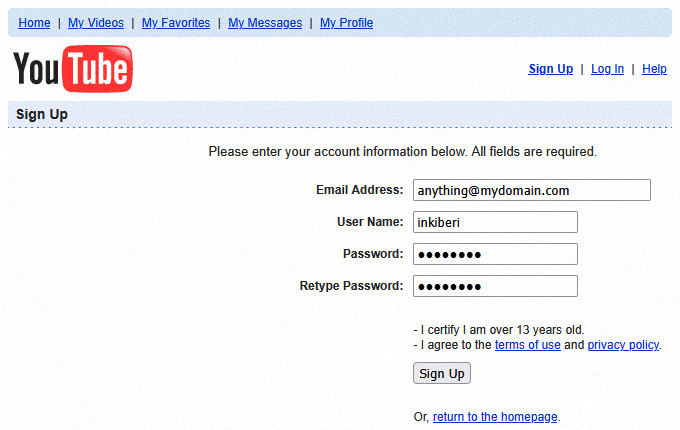
...And the email could be from any free service, solely requiring a username and a password.
